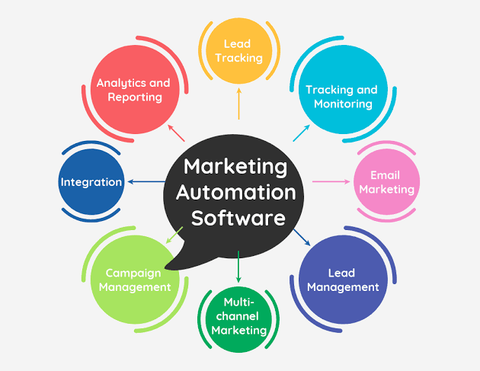
Best Email Marketing Software to Grow Your Business
Choosing the best email marketing software is an important consideration.
Email Marketing Software
These platforms help organize contact lists, create newsletters, schedule campaigns, and monitor engagement. Businesses can compare email marketing platforms based on their features, pricing, automation options, and ease of use.
Email remains a practical communication channel for sharing product updates, company announcements, educational content, and special offers. However, managing campaigns manually can become difficult as contact lists and communication requirements grow. Email marketing tools provide organized systems that help businesses manage these activities more efficiently.
What Is Email Marketing Software?
Email marketing software is a digital platform designed to create, send, and analyze marketing emails. Most platforms include tools for managing subscribers, designing email templates, scheduling messages, and tracking campaign performance.
Some advanced platforms also offer customer segmentation, automated workflows, personalization, and integration with customer relationship management systems. These features allow businesses to organize communication according to customer interests and activities.
Why Do Businesses Use Email Marketing Tools?
Businesses use email marketing tools to maintain communication with existing customers and reach interested audiences. They can distribute newsletters, share useful information, announce new services, and provide updates through organized campaigns.
These platforms also make it easier to manage large contact lists while maintaining consistent communication. Their reporting features help businesses understand how recipients interact with different messages.
Importance of Choosing the Right Email Marketing Platform
Selecting an appropriate email marketing platform can influence how efficiently a business manages its marketing activities. A suitable system should match the company's audience size, communication goals, technical requirements, and available budget.
Not every business needs advanced automation or complex reporting. Smaller organizations may prefer simple campaign creation tools, while larger businesses may require detailed segmentation, integrations, and workflow management.
Improving Customer Communication
Email marketing provides a direct way to share relevant information with subscribers. Businesses can organize communication around customer interests, previous interactions, or subscription preferences.
For example, an online retailer might send order updates, product announcements, and newsletters. A professional service provider may use email to distribute educational resources and company updates.
Supporting Marketing Efficiency
Email automation software can reduce repetitive manual activities. Businesses can create workflows that send messages after specific actions, such as subscribing to a newsletter or registering for an event.
Automation does not eliminate the need for planning and review. Businesses should regularly check their messages, audience settings, and sending schedules to maintain relevant communication.
Popular Email Marketing Software Options
Different platforms offer different combinations of campaign management, automation, integrations, and reporting features. The following examples help explain the types of solutions businesses may compare.
Mailchimp
Mailchimp is an email marketing platform that provides campaign creation, audience management, templates, and automation features. It is commonly considered by businesses looking for a combination of email marketing and marketing management tools.
Brevo
Brevo provides email marketing, automation, contact management, and additional communication features. Businesses may consider it when evaluating platforms that support multiple customer communication channels.
Constant Contact
Constant Contact offers email campaign creation, contact management, templates, and marketing-related tools. Its features may be relevant to small businesses and organizations that prefer structured campaign management.
GetResponse
GetResponse provides email marketing, automation workflows, landing pages, and other digital marketing features. Businesses can evaluate its available functions according to their campaign requirements.
ActiveCampaign
ActiveCampaign focuses on email marketing automation, customer relationship management, and customer communication workflows. It may be considered by organizations that require more detailed automation and customer management capabilities.
Comparing Email Marketing Software Features
Before choosing a platform, businesses should compare the features that directly support their marketing activities. A platform with many functions is not necessarily the most appropriate option for every organization.
| Software | Main features | Common consideration |
|---|---|---|
| Mailchimp | Campaigns, templates, audience management | General marketing needs |
| Brevo | Email campaigns, automation, communication tools | Multiple communication channels |
| Constant Contact | Email templates, contact management | Small business campaigns |
| GetResponse | Automation, landing pages, email campaigns | Broader marketing activities |
| ActiveCampaign | Automation, CRM, customer workflows | Advanced customer management |
Feature availability and pricing can change depending on subscription plans, contact limits, and usage requirements. Businesses should check the providers' official websites for current plan details before making a purchase decision.
Essential Features to Evaluate
When comparing the best email marketing services, consider these important features:
Email builder: A simple editor helps users create and format professional-looking messages.
Contact management: Organized subscriber lists make it easier to manage audience information and preferences.
Automation: Automated workflows support scheduled and behavior-based communication.
Segmentation: Audience groups help businesses send more relevant messages.
Analytics: Reports provide information about delivery, clicks, engagement, and other campaign measurements.
Integrations: Connections with websites, online stores, and CRM systems support coordinated marketing activities.
Email Marketing Software Pricing and Selection
Email marketing software pricing varies according to the provider, subscription plan, contact list size, sending volume, and available features. Some providers offer limited free plans, while others use monthly or annual subscriptions.
Understanding Pricing Structures
Businesses should understand how different pricing models work before selecting a service. Common pricing considerations include:
Subscriber-based pricing: Charges may depend on the number of contacts stored in the account.
Email-volume pricing: Some plans consider the number of messages sent each month.
Feature-based pricing: Advanced automation, reporting, and integrations may require higher subscription levels.
Additional services: Dedicated support or specialized features may involve separate costs.
An affordable email marketing software option should be evaluated according to its actual usefulness, not simply its lowest advertised price.
Choosing Software for Business Size
Small businesses often benefit from straightforward campaign builders, basic reporting, and manageable subscription costs. Growing organizations may need additional automation, segmentation, and integration capabilities.
Larger businesses may require advanced user permissions, detailed reporting, and systems that support complex customer communication. Reviewing current and future requirements can help avoid unnecessary changes between platforms.
How to Choose and Buy Email Marketing Software
Before deciding to buy email marketing software, businesses should identify their primary communication goals. These might include distributing newsletters, generating inquiries, maintaining customer relationships, or supporting online sales.
Review Platform Compatibility
Check whether the software integrates with existing business systems, such as website platforms, online stores, CRM applications, and analytics tools. Compatibility can reduce manual data handling and improve coordination.
Check Privacy and Compliance Features
Businesses should understand applicable email marketing and data protection requirements. Depending on the audience's location, regulations may require clear consent, identification of the sender, and an accessible unsubscribe option.
It is also important to review subscriber data handling, account security, and the provider's privacy practices.
Test Before Making a Decision
Where available, use a trial or free plan to explore the platform. Test the email editor, contact management, reporting dashboard, and automation features before selecting a paid subscription.
Frequently Asked Questions
Which Is the Best Email Marketing Software for Small Businesses?
The suitable platform depends on budget, contact list size, automation requirements, and ease of use. Mailchimp, Brevo, and Constant Contact are examples worth comparing.
How Much Does Email Marketing Software Cost?
Pricing varies by provider, subscription level, contact limits, and sending volume. Some services offer free plans, while advanced features may require paid subscriptions.
Is Email Automation Software Necessary?
Automation can help businesses manage repetitive communication and scheduled messages. However, businesses with simple marketing requirements may not need advanced workflows.
Can Email Marketing Software Improve Customer Engagement?
These platforms provide tools for targeted communication, personalization, and performance analysis. Results depend on message quality, audience relevance, and campaign management.
What Should Businesses Check Before Purchasing?
Businesses should compare features, pricing, integrations, subscriber limits, privacy controls, customer support, and cancellation conditions.
Conclusion
The best email marketing software depends on a business's communication goals, audience size, budget, and technical requirements. Comparing available platforms helps identify suitable tools for campaign creation, automation, subscriber management, and performance tracking.
A careful evaluation of features, pricing, privacy practices, and scalability can support a more informed purchasing decision.

Related Post...

Digital Invoice Basics: Complete Overview, Key Facts, and Essential Knowledge
Updated: October 30, 2026
Read More